
Are you ready to make your living room feel like a proper home theater with real surround sound?

Buy The ULTIMEA Aura A60 7.1ch Sound Bar On Amazon
Quick Verdict
You’ll find the ULTIMEA 7.1ch Sound Bar with Dolby Atmos (Aura A60) delivers a lot of features for the price, including true multichannel surround with four surround speakers and a dedicated subwoofer. If you want clearer dialogue, immersive Atmos effects, and deep bass without a tangle of cables, this system hits most of the right notes while giving you strong customization via an app.
ULTIMEA 7.1ch Sound Bar with Dolby Atmos, Surround Sound System for TV with 4 Surround Speakers, Sound Bar for Smart TV with App Control, Soundbar with Subwoofer for Home Theater, HDMI eARC, Aura A60
$198 In Stock
Product Overview
The ULTIMEA 7.1ch Sound Bar with Dolby Atmos, Surround Sound System for TV with 4 Surround Speakers, Sound Bar for Smart TV with App Control, Soundbar with Subwoofer for Home Theater, HDMI eARC, Aura A60 is built to give you an immersive 3D soundstage. It combines a 3-channel front array for dialogue plus four surround speakers and a 4″ wired subwoofer that uses BassMX technology to reinforce low-end impact. You’ll appreciate the Dolby Atmos support, app-based tuning, and multiple connection options if you want a more cinematic experience than typical soundbars.
What’s in the Box?
You’ll get the soundbar, four surround speakers (two front surrounds and two rear surrounds), a 4″ wired subwoofer, remote control, power cables, speaker wires where required, and basic documentation. The rear surrounds pair wirelessly to the soundbar, but one of them needs to be powered to create the wireless link, which reduces visible cable clutter.
Purchase The ULTIMEA Aura A60 On Amazon
Key Specifications
Below is a concise breakdown of the Aura A60’s main specs so you can scan the important details quickly. The table will help you compare or reference features while you read the rest of the review.
| Feature | Details |
|---|---|
| Model | ULTIMEA Aura A60 (7.1ch) |
| Channels | 7.1 (3 front channels + 4 surround speakers) |
| Dolby Atmos | Yes |
| Surround Speakers | 4 (2 wired front surrounds, 2 wired rear surrounds; rear pair wirelessly connect to soundbar) |
| Subwoofer | 4″ wired subwoofer with BassMX technology |
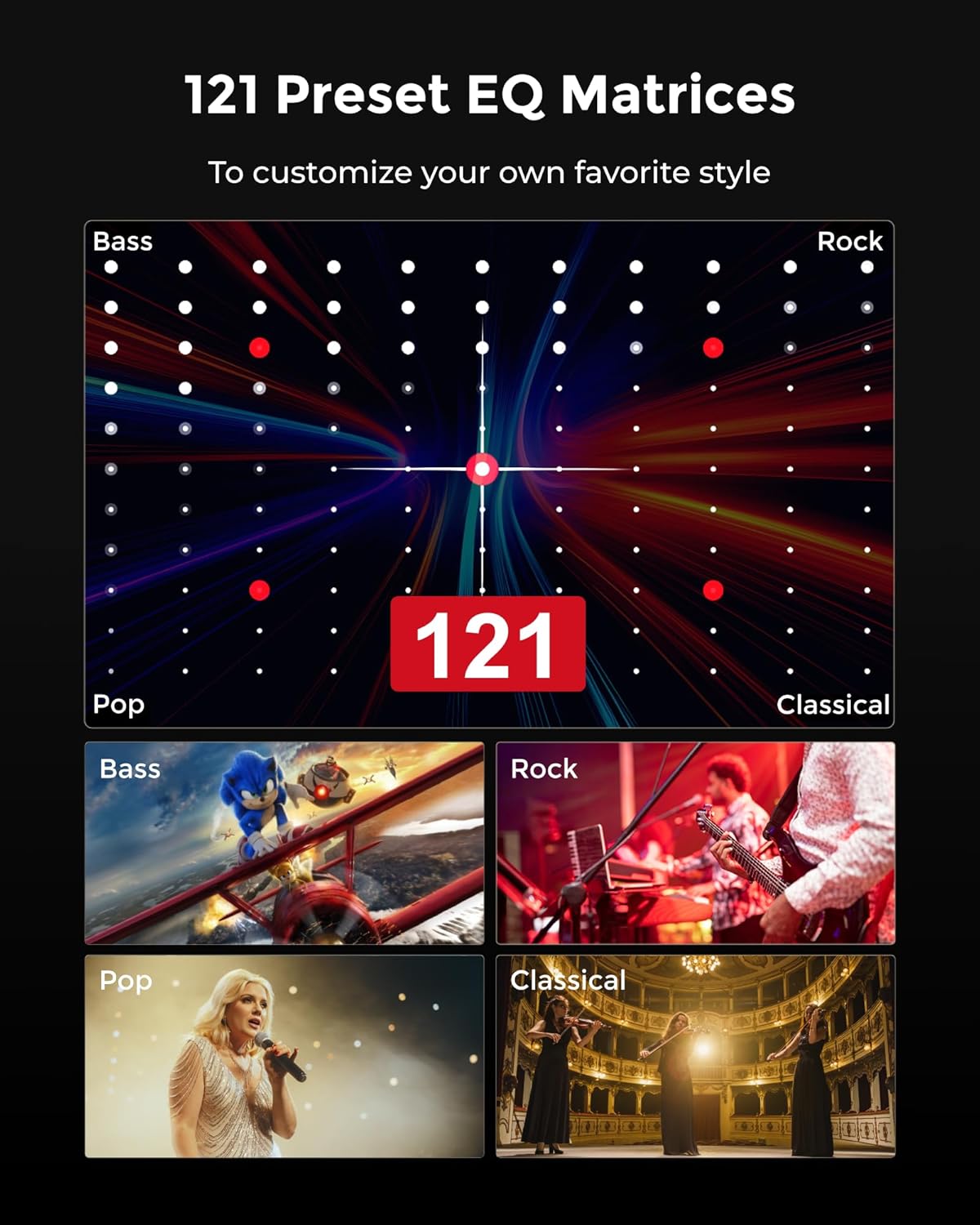
| EQ Presets | 121 expert presets; 10-band EQ; 6 tailored EQ modes |
| App Control | Ultimea App with Customize feature |
| Recommended Room Size | 108 to 270 ft² |
| Connectivity | HDMI eARC, Optical, AUX, Bluetooth, USB (varies by region) |
| Special Features | BassMX, customizable multi-band EQ, wireless rear connection |
| Ideal Use | Home theater, movies, TV, music, gaming |
| Placement | Wall-mountable or shelf; rear surrounds placed around seating area |
| Power Output | Manufacturer-stated combined power (varies) |
| Dimensions & Weight | Varies by unit; check box for exact numbers |
Design and Build Quality
The Aura A60 has a design that feels modern without being flashy, which helps it blend into a living room setup. The main soundbar has a clean front grille and compact footprint, making it easy to place under most TVs, and the surround speakers are small and unobtrusive so they don’t dominate the room visually.
Materials are lightweight but appear durable enough for typical home use, and the subwoofer’s compact 4″ driver keeps the system size manageable while still delivering noticeable bass. Overall, the build quality matches what you’d expect from mid-range home theater gear: functional, neat, and practical for an everyday setup.
Physical Footprint and Mounting
You can place the soundbar on a media console or mount it on the wall, depending on your TV setup. The small surrounds are easy to position on shelves or stands, and the subwoofer fits comfortably near furniture without taking much space.
If you plan to wall-mount the bar, make sure you measure clearance for cables and double-check TV and bar heights to get the best dialogue alignment with your ears.

Setup and Installation
Setting up the Aura A60 is straightforward, but there are a few steps you should follow to get the best performance. You’ll connect the soundbar to your TV via HDMI eARC for the simplest, highest-quality audio transfer, and then place the surround speakers and subwoofer around your seating position according to the included guidance.
Step-by-Step Setup Tips
- Connect the soundbar to the TV using HDMI eARC if available, or optical if not. HDMI eARC will pass Dolby Atmos and higher-bandwidth audio formats when supported by your TV and source. Make sure your TV’s eARC setting is enabled in the TV menu.
- Power the rear surround speaker that acts as the wireless bridge so the pair can connect to the soundbar. You’ll still need to place the other surrounds and the subwoofer in their chosen locations.
- Use the Ultimea App to run initial audio setup and select the appropriate room mode. The app simplifies getting EQ presets and other settings right for your space.
- Fine-tune speaker placement after listening to a few movie scenes or music tracks to balance dialogue clarity and surround effects.
Physical Connections
You’ll find HDMI eARC as the preferred input because it preserves Dolby Atmos and multichannel signals. If your TV or source device doesn’t support eARC, optical will work for multichannel PCM and most Dolby formats, but some Atmos passthrough may be limited. Bluetooth is handy for casual music streaming but won’t provide the same fidelity or multichannel capability as wired options.
Wireless Pairing and App Control
The Aura A60 uses a hybrid wired/wireless approach: the rear speakers connect wirelessly to the soundbar after you power the designated bridging surround. That greatly reduces cable clutter compared with completely wired surround packages.
The Ultimea App gives you remote control, access to 121 EQ presets, the 10-band EQ, and tailored modes. Pairing and firmware updates can be done through the app, which simplifies ongoing tweaks and feature improvements.

Sound Performance Overview
Sound is where the Aura A60 matters most, and its 7.1ch layout with Dolby Atmos gives you a clear upgrade over single soundbar options. The front 3-channel array focuses on dialogue and center imaging, while the four surrounds expand the soundstage laterally and behind you. Dolby Atmos adds height effects when content supplies object-based audio, and the small 4″ subwoofer does a respectable job adding low-end weight to explosions, music, and effects.
Dialogue and Midrange
You’ll notice dialogue is generally clear thanks to the dedicated center or center-like front channel arrangement. Voices remain intelligible at moderate volumes, and the bar does a good job of preventing dialogue from getting lost under score or effects when you use the Voice or Movie EQ modes.
If your room is reflective or large, you might still need minor EQ adjustments in the app to push mids a bit more, but most users should find clarity good out of the box.
Lows and Bass
The 4″ wired subwoofer with BassMX technology is tuned to deliver punch and a satisfying thump for its size. You’ll feel impact during action scenes, and music will gain extra body that a soundbar alone can’t produce. Don’t expect ear-rattling sub-bass that a large separate sub would throw out, but the BassMX tech improves transient response and provides a fuller, tauter bass presence than generic small subs.
Placement matters: moving the sub a foot or two can noticeably change bass response. Corner placement boosts output, while keeping it away from walls gives tighter, cleaner bass.
Highs and Detail
High frequencies are generally clear and non-fatiguing. The Aura A60 avoids harsh treble at higher volumes, which is helpful for long movie sessions or late-night listening. Cymbals and breathy vocal details translate well, and the system retains sparkle without ringing or sibilance dominating the mix.
If you prefer brighter sound for certain music genres, use the app’s presets or custom EQ to lift higher frequencies to taste.
Surround and Dolby Atmos Performance
You’ll get a convincing surround field for most TV shows and films: ambient effects move around you better than with stereo-only bars, and the rear speakers add proper depth. Dolby Atmos content provides elevation cues and more precise placement of effects, though the sense of “overhead” height won’t match ceiling-mounted or upward-firing driver systems. Still, for movies and gaming, you’ll notice a wider soundstage and better immersion with the Aura A60 than with simpler solutions.
App and Customization
The Ultimea App is one of the system’s standout features because it gives you deep control from your phone. With 121 expert EQ presets, a 10-band graphic EQ, and modes like Movie, Music, Voice, Sport, Game, and Night, you can quickly switch tonal profiles or fine-tune settings to suit specific content.
The Customize feature is particularly valuable: if you like to tailor sound precisely, you can save personal EQ curves and recall them for different use cases. The app also handles pairing, firmware updates, and basic system control, making it a central part of your experience.
EQ Presets and Customize Mode
You’ll likely start with one of the 121 presets to match the genre—there are presets tailored for bass-heavy music, acoustic tracks, classical, and more. If none of the thousands of preset configurations exactly match your taste, the 10-band EQ and Customize option let you build a profile that’s uniquely yours.
Having that many presets can feel overwhelming, so try a handful that match your top-used genres and save favorites to streamline daily use.
Connectivity and Smart Features
The Aura A60 supports modern connections with HDMI eARC, optical, and streaming via Bluetooth for convenience. HDMI eARC is crucial if you want full Atmos passthrough from sources like UHD Blu-ray players or Atmos-enabled streaming devices through a compatible TV.
There’s no built-in voice assistant listed in the core feature set, but app control and common Bluetooth/HDMI connection options are sufficient for most users. Firmware updates through the app can add refinements over time.
Room Performance and Placement Tips
You’ll get the best results within the recommended 108 to 270 ft² room size. Smaller rooms may find the system overkill, while very large rooms might not get full immersion from a 4″ sub and a compact bar. Correct placement of the surrounds and subwoofer can dramatically improve perceived performance.
Position the front bar under the TV with the center aligned toward ear height. Place the rear surrounds slightly behind and to the sides of the seating position, ideally at ear height when seated. Move the subwoofer around the room to find the sweet spot—often near a front corner or against a side wall for stronger bass, or more central for tighter response.
Handling Acoustic Problems
If the room feels boomy or muddy, reduce subwoofer level or use the app EQ to tame low-frequency bands. For echoey rooms, soft furnishings like rugs and curtains help absorb reflections and improve clarity. If the surround imaging feels vague, try angling the rear speakers slightly toward listeners and verify the bridge speaker (the powered rear) has an unobstructed line to the soundbar for reliable wireless link.
Comparison with Competitors
The Aura A60 competes with other mid-range soundbar packages from brands like Samsung, Sony, Vizio, and JBL. Compared with single-unit Atmos soundbars, the Aura A60’s multichannel approach with four discrete surrounds gives it an advantage in true surround imaging.
Against higher-end models, the Aura A60’s smaller sub and modest power may be less commanding, but it often outperforms budget soundbars in surround presence and app customization. If you want the cleanest Atmos overhead effects, a unit with upward-firing drivers or additional speakers might offer more height, but the Aura A60 balances cost, features, and surround impact well.
Pros and Cons
You’ll want to weigh the strengths and trade-offs before deciding if this system fits your needs.
Pros:
- True 7.1 configuration with four surround speakers adds real surround imaging.
- Dolby Atmos support gives more immersive 3D sound for compatible content.
- BassMX-equipped 4″ subwoofer provides punchy, controlled low end.
- Extensive app-based customization with 121 presets and a 10-band EQ.
- HDMI eARC support for high-quality audio pass-through.
- Wireless rear speaker pairing reduces cable clutter.
Cons:
- Rear pair still requires one powered unit to create the wireless bridge, which means some cable management is needed.
- The small 4″ subwoofer won’t match the deep extension of larger dedicated subs.
- Overwhelming number of presets could be confusing for users who prefer simpler controls.
- Soundstage height won’t be as pronounced as systems with upward-firing drivers or ceiling speakers.
Who Should Buy This?
If you want a step up from a simple stereo soundbar and value true surround sound, you’ll be pleased with the Aura A60. It’s a solid choice for apartment living or moderate-sized living rooms where you want cinematic sound without running a ton of speaker cables. Gamers, movie lovers, and TV watchers who prioritize dialogue clarity and immersive effects will benefit most.
If you have a large open-plan room or need extreme bass output for home theater, consider pairing the system with a larger subwoofer or looking at higher-end multi-driver systems. But for buyers seeking an affordable and well-rounded surround solution with modern features, the Aura A60 is a strong candidate.
Troubleshooting and Practical Tips
When you run into common problems, a few practical steps usually fix things quickly.
- No sound through HDMI: Check that your TV’s HDMI eARC is enabled and that the input device is sending audio to the TV. Sometimes you must set the TV’s audio output to Bitstream or Passthrough for Atmos.
- Rear speakers won’t pair: Ensure the designated powered rear speaker is connected and within range. Restart the soundbar and the rear speaker and attempt pairing again through the app if available.
- Lip sync issues: Use your TV or the soundbar’s audio delay setting to nudge timing until audio matches on-screen lip movements.
- Weak bass: Move the subwoofer to different locations, raise the sub level via the app, or try a different EQ preset. Corner placement usually increases perceived bass.
- Bluetooth dropouts: Keep devices close to the bar and minimize sources of Wi-Fi interference. For critical listening, use wired connections.
Final Thoughts and Recommendation
If you want a real surround experience and the flexibility of app-based tuning, the ULTIMEA Aura A60 delivers excellent value. You’ll enjoy clear dialogue, immersive Atmos benefits, and a surprisingly capable subwoofer for its size. While not perfect for massive rooms or extreme bass needs, this system stands out among mid-range options for the completeness of its feature set and the practicality of a mostly wireless rear setup.
You’ll get the most satisfaction if you follow the placement guidance, use HDMI eARC where possible, and spend a little time customizing the EQ in the app to match your listening preferences.
FAQ
Q: Will this soundbar work with my older TV that doesn’t have HDMI eARC?
A: Yes, it will work via optical or other analog inputs for TV audio, but Dolby Atmos passthrough may be limited. Optical supports high-quality audio but not the full bandwidth of eARC for object-based Atmos streams.
Q: Do the surround speakers need wires running to them?
A: The system uses a hybrid approach: the rear surround pair connects wirelessly to the soundbar, but one of the rear units needs to be powered and acts as the bridge. Two front surrounds are wired to the soundbar. This reduces cable clutter compared with fully wired setups.
Q: Can I add a bigger subwoofer later?
A: In many setups you can, depending on the available subwoofer output and system compatibility. Check the manual or app for subwoofer output details and whether the system supports third-party subs.
Q: How loud can this system get without distortion?
A: The Aura A60 can reach comfortably loud levels for medium-sized rooms while keeping distortion relatively low. For very high SPL levels in large rooms, you might notice strain—adding a larger subwoofer and verifying correct EQ helps maintain clarity at higher volumes.
Q: Is the Ultimea App reliable?
A: The app provides deep customization and control, and users report it works well for EQ, presets, and firmware updates. Like any app, occasional updates may be needed for stability and compatibility with phone OS updates.
Q: Is this system good for gaming?
A: Yes, the surround configuration and Dolby Atmos support make it a compelling choice for gaming, particularly for titles that support object-based audio and require positional cues. Use the Game mode in the app to lower latency and prioritize directional effects.
Q: Are there presets for late-night viewing without disturbing others?
A: The Night mode in the app reduces dynamics and tames loud peaks so you can enjoy movies quietly while preserving dialogue clarity.
Q: Does the Aura A60 support voice assistants like Alexa or Google Assistant?
A: The core feature list centers on app control, HDMI eARC, and Bluetooth. Native voice assistant integration isn’t a highlighted feature; however, you might still control playback indirectly through a smart TV or connected device that supports voice controls.
If you want, I can help you compare the Aura A60 directly with a specific soundbar model you’re considering, or walk you step-by-step through an ideal setup for your room size and furniture layout.
Check The Latest Price For ULTIMEA Aura A60 Sound Bar
Disclosure: As an Amazon Associate, I earn from qualifying purchases.