
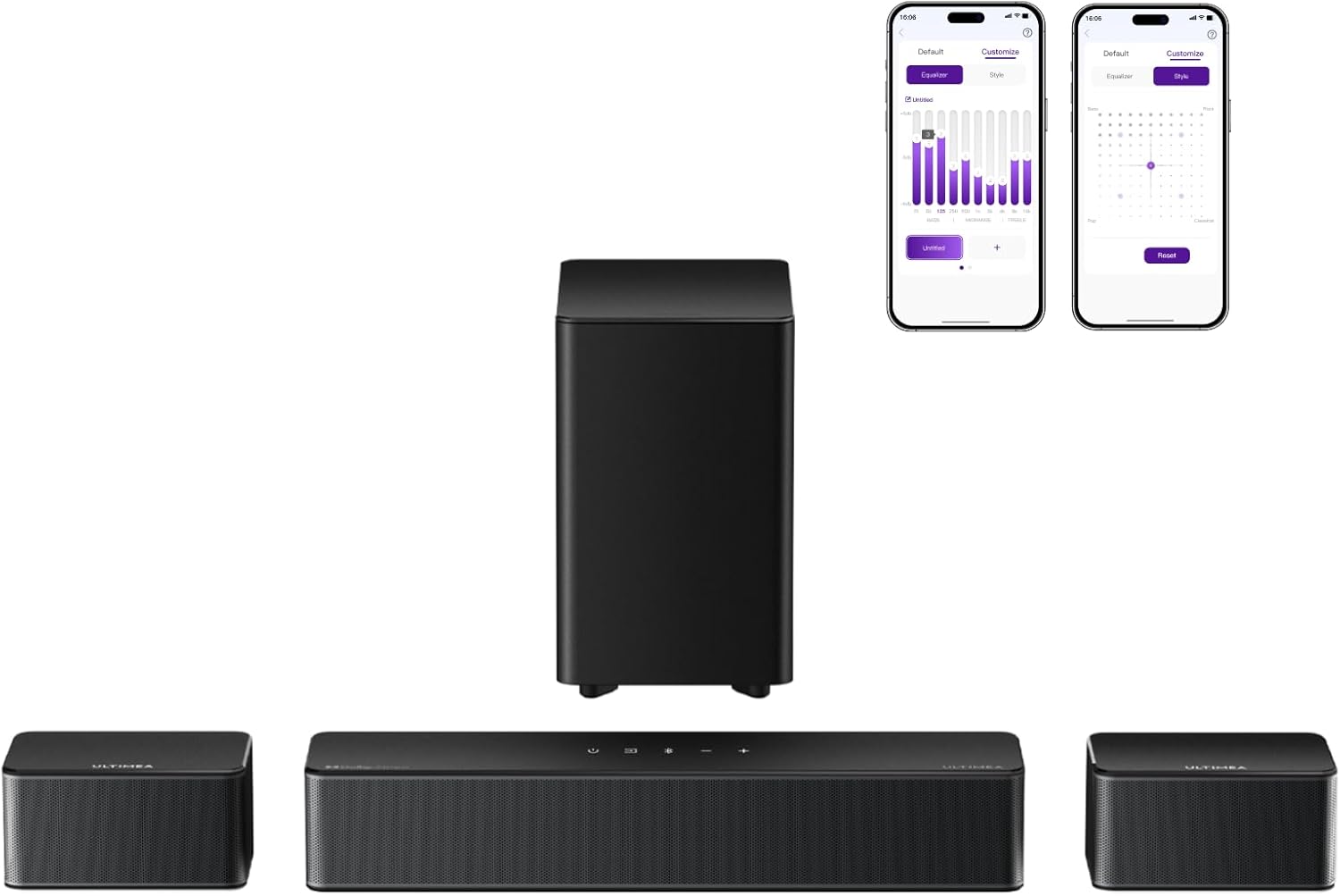
Are you trying to decide if the ULTIMEA 5.1 Sound Bar, 410W Dolby Atmos Surround Sound System (Poseidon D60 — New 2025 Version) is the right audio upgrade for your TV setup?


Quick verdict
You get a feature-rich 5.1 system with Dolby Atmos, a wireless subwoofer, wired rear speakers, and extensive app-based tuning. If you want cinematic sound without running speaker wires around the room, this package gives you a lot of power and customization for the price.
ULTIMEA 5.1 Sound Bar, 410W Dolby Atmos Surround Sound System for TV, 3D Sound Bars for Smart TV w/Subwoofer, Adjustable Surround & Bass, Home Audio w/APP Control, Poseidon D60(New 2025 Version)
$189.99 In Stock
What you get in the box
You’ll find the soundbar, a wireless subwoofer, two wired rear speakers, remote, power cords, and an HDMI-eARC cable included. The bundle is intended to be a ready-to-go 5.1 system so you can get from unboxing to listening with minimal extra purchases.
Included components
Below is a clear breakdown of what is included and what to expect from each piece. These items are the main physical components you’ll interact with during setup and daily use.
| Item | Quantity | Notes |
|---|---|---|
| Soundbar (Poseidon D60) | 1 | Main unit with three front channels and control interface |
| Wireless subwoofer | 1 | Dedicated low-frequency driver; wireless for the bass signal |
| Rear speakers (wired) | 2 | Connect using the 20-foot cables provided for flexible placement |
| Remote control | 1 | Controls power, volume, modes, and bass/surround adjustments |
| HDMI-eARC cable | 1 | Ensures high-resolution audio and Dolby Atmos passthrough |
| Power cables | 2+ | For soundbar and subwoofer (and potentially for rear speakers if active) |
| Quick start guide | 1 | Setup steps and app pairing instructions |
Key specifications
These are the headline specs you’ll want to check against your room size and expectations before buying. The specs help you match the system to your TV, content sources, and listening habits.
| Specification | Detail |
|---|---|
| Total power output | 410W (claimed) |
| Channels | True 5.1: three front channels + two rear speakers + subwoofer |
| Dolby Atmos | Supported (playback) |
| DTS decoding | Not supported |
| Subwoofer type | Wireless (signal); powered subwoofer |
| Rear speaker cabling | Wired, includes 20-foot cables |
| App control | ULTIMEA Smart App with OTA updates |
| EQ & presets | 121 EQ presets; 10-band equalizer; 6 sound modes |
| Sound enhancement | BASSMX boost for low-end |
| Connectivity | HDMI-eARC included. Other ports: refer to product manual for optical, USB, Bluetooth (varies by region) |

Design and build quality
You’ll notice the ULTIMEA system looks modern and understated, designed to match contemporary TVs without drawing attention. The materials feel sturdy for the price point, and the subwoofer has a solid presence that signals real low-frequency capability.
The rear speakers are compact and unobtrusive, which helps if you prefer a cleaner living-room aesthetic. The wired connection to the rear speakers is practical: it avoids battery swapping and maintains consistent signal quality.
Setup and installation
You’ll likely have the system running in under an hour if your TV sits near your main furniture and you follow the quick start guide. The included HDMI-eARC cable simplifies the audio path for Dolby Atmos content, so you won’t need extra adapters for most modern TVs.
If your TV doesn’t have eARC, you can still connect via optical or other outputs (check the manual for exact port compatibility). Placement and cable routing for the rear speakers are the biggest physical tasks, but the 20-foot wires give you room to position them properly.
Physical placement and wiring
You should place the soundbar centered under or above your screen for best imaging, and the subwoofer in a corner or along a wall for punchier bass. The rear speakers should sit behind your main seating area and be roughly at ear height when seated for proper surround imaging.
Because the rear speakers use wired connections, plan routes for the 20-foot cables to keep them tidy. You can use cable clips, raceways, or hide them behind baseboards depending on your room layout.
TV compatibility and connectivity
You’ll want a TV with HDMI-eARC to get full Dolby Atmos passthrough with multi-channel audio. If your TV lacks eARC, you’ll still get good stereo or surround from other digital outputs, but you may lose object-based Atmos metadata.
Confirm the ports on your TV and streaming devices before setup. The included HDMI-eARC cable is ideal for present-day TVs and streaming players that support Atmos content.
Using the ULTIMEA Smart App
You can control many features from the ULTIMEA Smart App, making daily adjustments easier than juggling the remote. The app handles firmware updates over-the-air so you’ll get improvements without digging for a USB stick.
Pairing in the app is straightforward and gives you access to the extensive equalization options and sound modes. If you like to tailor audio to different content types, the app is where you’ll spend most of your time.
EQ presets and customization
You get 121 EQ presets and a 10-band equalizer, which gives you near pro-level control over tonal balance. The presets are useful if you want a quick starting point, while the 10-band EQ lets you fine-tune details like vocal clarity or high-frequency brightness.
You can save custom settings for specific content — for example, a movie preset with enhanced sub-bass and a music preset with flatter mids. This level of control helps you get the most from both Atmos content and stereo tracks.

Sound performance overview
The ULTIMEA 5.1 system aims to present a cinematic soundstage with clear front imaging, actionable surround effects, and impactful bass. You’ll notice the system emphasizes clarity and warmth in the midrange, which benefits dialogue-heavy content like podcasts and TV shows.
Dolby Atmos material will sound more layered and spacious than straightforward stereo mixes, particularly when you use your app settings to emphasize height and rear presence. The system won’t match a high-end multi-driver AVR + tower speaker setup, but it delivers impressive value for a soundbar-based 5.1.
Movies and Dolby Atmos performance
When you play Atmos-enabled movies from Blu-ray or streaming services that pass Atmos through eARC, you’ll hear distinct movement and overhead feel in many scenes. Explosions and environmental ambience gain a vertical dimension that draws you into action sequences.
For blockbuster soundtracks, the system produces satisfying low-frequency impact without overwhelming the room, thanks to the BASSMX boost and the paired subwoofer. You should expect immersive front-to-back movement for most content, though the topmost “ceiling” effects may be less pronounced than systems with dedicated upward-firing drivers.
Music performance
You’ll get strong performance with contemporary music, especially bass-forward tracks where the subwoofer adds punch. Pop, EDM, and hip-hop all benefit from the unit’s low-end emphasis, and the clarity in the midrange ensures vocals remain front-and-center.
If you listen to acoustic or classical music, you can use the app’s EQ and presets to flatten the bass and reveal more air and detail. In these genres, the system is competent but won’t replace a dedicated two-channel audiophile setup for subtle spatial cues and decay.
Gaming and latency
You’ll appreciate the sense of immersion in cinematic single-player games thanks to the surround channels and weighty low end. The HDMI-eARC connection typically keeps latency low, but for the absolute lowest delay in competitive online gaming you may want to confirm your TV’s passthrough and game modes.
Directional effects and explosions have good placement, making it easier to locate in-game action. The combination of quick transient response and thumping bass makes action sequences feel visceral and satisfying.
Voice clarity and dialogue
Dialogues come through clearly thanks to the soundbar’s midrange tuning and the three front channels. You’ll be able to follow speech in busy mixes without constantly increasing volume, which helps during late-night TV or dramatic films.
If dialog still feels buried in specific content, use the Voice mode in the app or remote to emphasize center-channel frequencies. Small adjustments to the midrange EQ can make a dramatic difference in intelligibility.
Bass performance and subwoofer
The wireless subwoofer provides substantial low-frequency extension and punch without needing to be wired directly to the soundbar. You’ll get rumble during explosions and fullness during orchestral swells, and you can dial the sub’s intensity via the remote or app.
The subwoofer’s wireless nature makes placement easier — put it where it sounds best rather than where a cable reaches. If you prefer subtlety, lowering the sub level will produce a tighter, more controlled sound that still supports the main speakers.
Rear speakers and surround imaging
The wired rear speakers play a critical role in creating a believable surround field, and the 20-foot cables give you freedom to place them properly behind your seating. You’ll find that ambient sounds and directional cues have clearer placement than with virtual surround alone.
Because the rear speakers are discrete, you’ll hear genuine surround effects rather than processed simulations. This produces a cleaner separation and more convincing envelopment during action scenes or concerts.
Adjustability and sound modes
You’ll appreciate six preset sound modes (Movie, Music, Voice, Sport, Game, Night) that let you switch quickly depending on content and listening environment. The Night mode is handy for reducing low-frequency energy and dynamic range so you can watch late without disturbing others.
The 10-band equalizer and 121 presets let you craft the sound precisely. If you like to tune for room acoustics or listening preferences, the depth of control is one of the system’s strongest assets.
Connectivity and ease of use
The included HDMI-eARC cable simplifies high-resolution audio connections and reduces the number of boxes you need to manage. Pairing the speakers with the app is straightforward, and the remote handles quick changes if you prefer physical controls.
If your setup uses multiple sources (Blu-ray player, console, streaming stick), the eARC path typically handles sound from the TV’s ARC/eARC-enabled input, but ensure your source devices are connected properly for Atmos passthrough. Some users may need to adjust TV audio settings to ensure bitstreaming of Atmos content.
Firmware, updates, and long-term support
You’ll be able to receive OTA firmware updates via the ULTIMEA Smart App to enhance performance and add features. Regular firmware support is important because it can fix bugs, improve compatibility, and sometimes unlock additional codecs or features.
If you value ongoing improvements, using the app for updates is convenient. Keep an eye on release notes to take advantage of optimizations and new features.
Comparison with common alternatives
Compared to budget soundbars with simulated surround, this ULTIMEA system offers true rear channels and a physical subwoofer, which produces a more convincing 5.1 experience. Against higher-end soundbar + upward-firing speaker combos, it may not achieve the same vertical height effects, but its physical rear speakers give it an advantage in discrete surround imaging.
Versus traditional AV receiver + discrete speakers, you’ll sacrifice some ultimate audio fidelity and upgradeability. However, you benefit from plug-and-play ease, fewer components to manage, and a smaller footprint in your living room.
Pros and cons
You’ll want to weigh these strengths and weaknesses based on your priorities and room layout. The following table summarizes the main advantages and potential drawbacks.
| Pros | Cons |
|---|---|
| True 5.1 system with physical rear speakers and subwoofer | Rear speakers require running 20-foot cables |
| Dolby Atmos playback via HDMI-eARC | Does not decode DTS (may require PCM passthrough or other solutions) |
| 410W claimed output and BASSMX for impactful bass | Overly bright or bass-heavy if not EQ’d properly |
| ULTIMEA Smart App with deep EQ and OTA updates | Some users may prefer a simpler interface |
| Included HDMI-eARC cable and comprehensive bundle | Top-tier audiophile systems will outperform for fine detail |
Who should buy this
If you want a clear step up from TV speakers and virtual soundbars without committing to an AV receiver and separate speakers, this system is for you. You’ll benefit most if you regularly watch movies, play games, or stream Atmos-enabled content and want a more authentic surround feel.
You’ll also appreciate this system if you like customizing sound to your room and tastes using a detailed app-based equalizer and presets. The included cables and ready-made 5.1 setup make it a practical pick for many living rooms.
Who should not buy this
If you demand absolute audiophile accuracy for two-channel listening or plan to integrate a highly expandable home theater over time, a receiver-based system with larger floorstanding speakers may be a better fit. You may also want to skip this if you need DTS decoding built-in — that could be a dealbreaker depending on your content sources.
If you prefer a completely wireless surround experience without any rear cables whatsoever, then look for systems that use wireless rear satellites (note that those often require charging or wall power).
Tips for the best experience
You’ll get the most from the ULTIMEA system by spending a bit of time dialing in placement and EQ. Start with a conservative subwoofer level and gradually increase it until bass supports the soundtrack without overpowering dialog.
Experiment with the app presets and the 10-band EQ for different content types. Run a mix of movies, music, and games to establish your favorite baseline settings, and save custom profiles for fast switching.
Real-world listening notes
You’ll notice that action movies gain a satisfying rumble and clearer directional detail compared to most soundbars. The center channel and three-front-channel design focus vocal clarity and keep spoken lines intelligible even during loud scenes.
For streamed Atmos content, the system captures a sense of height and width that significantly raises immersion. Music lovers will appreciate the bass response for modern genres, while classical and jazz fans can tailor the EQ to reveal more detail and naturalness.
Value for money
You’ll find that this system offers substantial bang for the buck thanks to the true 5.1 layout, app-based tuning, and included HDMI-eARC cable. While it’s not a replacement for custom multi-room or high-end audiophile rigs, it’s a strong contender for most living rooms where space, simplicity, and cinematic impact matter.
If you compare features, the combination of hardware and software control here is generous in this price bracket. You’re effectively paying for a full surround experience and flexibility without the complexity of separate amplification and speaker matching.
Common questions you might have
You’ll probably wonder about compatibility, decoding, and placement specifics. If Atmos content doesn’t sound as expected, check TV audio passthrough settings, ensure eARC is enabled, and verify your streaming device supports Atmos.
If you’re concerned about cable routing for the rear speakers, consider running the wires along baseboards or behind furniture to keep them tidy. For any firmware issues, use the ULTIMEA Smart App for updates and troubleshooting steps.
Final verdict
If you want an immersive home theater upgrade that balances ease of use, customization, and genuine 5.1 surround imaging, the ULTIMEA Poseidon D60 is a compelling choice. You’ll benefit from real rear speakers, a powerful subwoofer, Dolby Atmos playback, and deep app-based tuning — making it a flexible and satisfying option for movies, music, and gaming.
Take the time to position the speakers correctly and tweak the EQ to your room, and the system will reward you with a much richer, more cinematic listening experience than your TV alone.

Disclosure: As an Amazon Associate, I earn from qualifying purchases.