
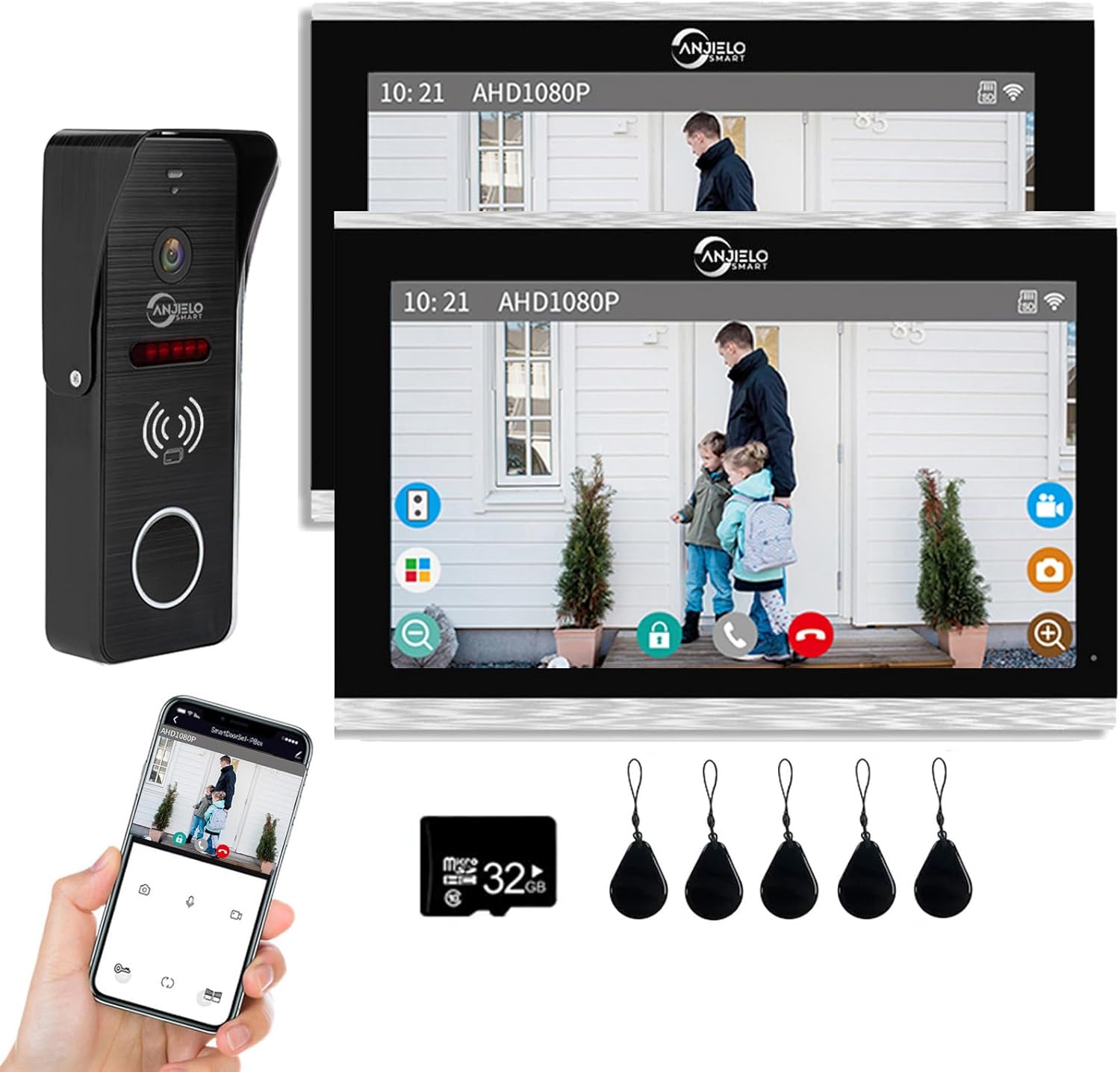
Have you been looking for a wired video doorbell system that gives you a stable connection, remote access, and card-based unlocking options?
Buy The Wired Video Doorbell 10 Inch Touch Monitor On Amazon
Product overview
You’re looking at the “Wired Video Doorbell Apartment Intercom 2 Units 10 inch Touch Monitor System 1080P Video Doorphone Door Camera TUYA WiFi Smart Home Door Phone Kits for Home Villa,32G”. The listing mixes a few details (the name says 10-inch, the specs mention a 7-inch TFT touch monitor), so you should confirm the exact monitor size before buying. Either way, this model is an IP-based wired doorbell system that integrates Tuya Smart app support, a wired doorbell-to-monitor connection for stability, and local recording on a microSD card.
Quick sense of what this product aims to do
It gives you real-time video calling to your phone using the TuyaSmart app, two-way audio, remote unlocking, and motion-triggered recording stored locally on the included 32GB microSD card. You’ll get multiple unlocking methods — via ID card, monitor touch, and app — and the system claims compatibility with common 12V electronic locks.
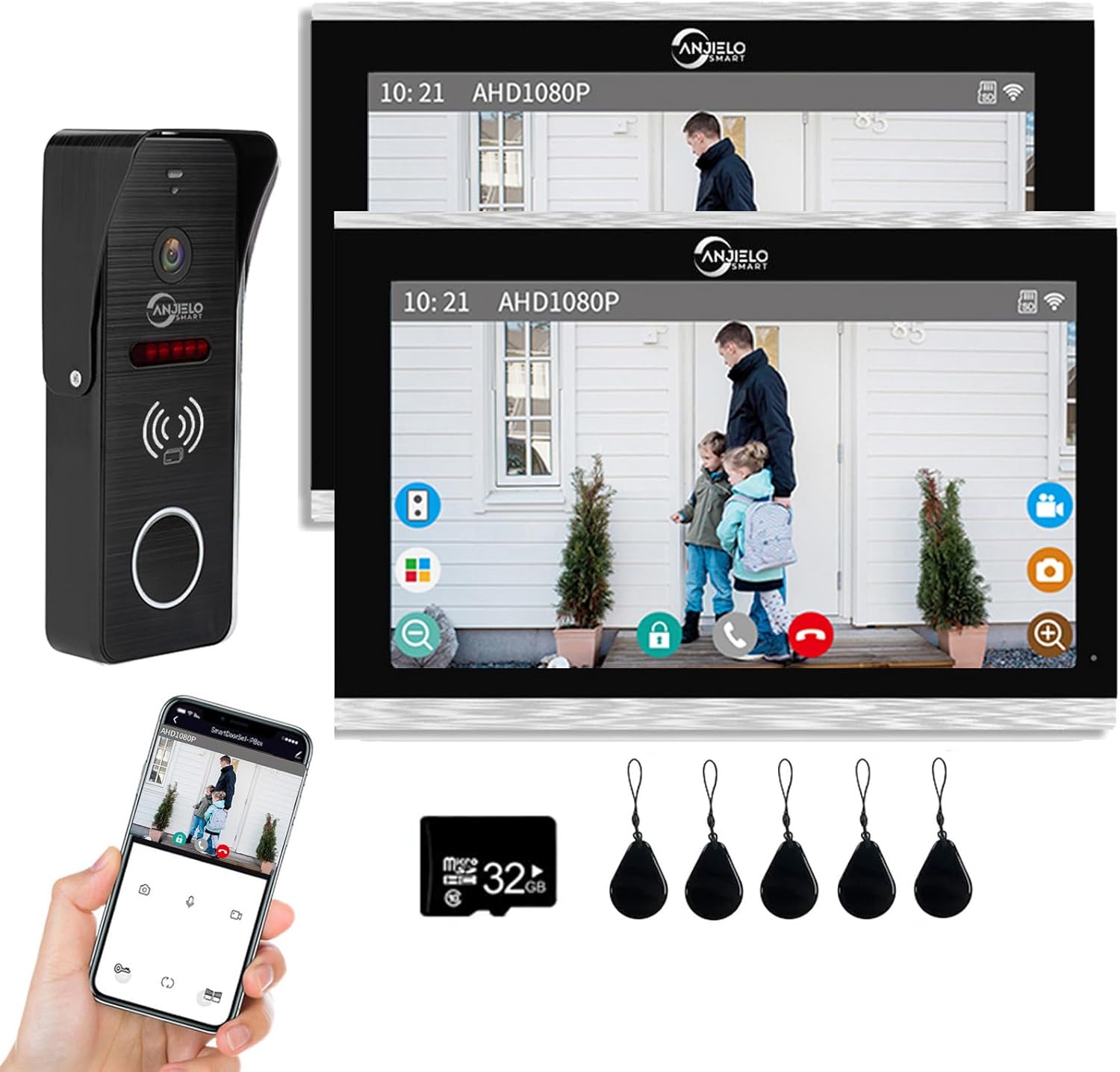
Wired Video Doorbell Apartment Intercom 2 Units 10 inch Touch Monitor System 1080P Video Doorphone Door Camera TUYA WiFi Smart Home Door Phone Kits for Home Villa,32G
Key specifications (at-a-glance)
You’ll want the specifics clearly laid out before installation and purchase. Below is a breakdown of the most important specs and features pulled from the product details.
| Feature | Specification / Notes |
|---|---|
| Monitor size | Product name says 10 inch; product details mention 7-inch TFT touch screen. Confirm before purchase. |
| Camera resolution | 1080P Full HD |
| Field of view | 160° wide-angle lens |
| Night vision | IR night vision with built-in infrared sensor |
| Weatherproofing | Rain cover, rainproof and dustproof design; anti-vandal claims |
| Connection type | Wired between doorbell and indoor monitor (requires RVV4 cable); monitor supports WiFi (only 2.4 GHz) |
| App | TuyaSmart (TUYA) for remote calling, unlock and monitoring |
| Storage | MicroSD card included (32GB). Automatic snapshot/video on motion detection. |
| Unlock methods | ID card (5 included), TUYA app, touch monitor |
| Expandability | Claims support: up to 6 indoor monitors; “Support 2 unlock” — verify exact meaning with seller |
| Power / locks | Can connect to 12V electronic locks |
| Included units | Listing title references 2 units (likely two monitors or doorbell + monitor pair) — verify package contents |
What’s in the box
You’ll want to check before you open the package so you know you received everything you need. Typical contents for this product usually include the outdoor doorbell camera unit, indoor touchscreen monitor(s), 32GB microSD card, a set of ID cards, mounting hardware, and a quick guide. If you order the 2-unit kit, verify whether that means two monitors, two doorbells, or a monitor + doorbell pair for two separate entry points.
Why this matters to you
Missing parts will delay setup and possibly require extra trips or returns. Confirming the package contents up front helps you avoid surprises and ensures you have everything to power, wire, and mount the components.
Design and build: what to expect
You’ll notice a sturdy outdoor panel with a rain cover and vandal-resistant housing. The indoor monitor has a slim TFT touch screen design (7-inch referenced in specs, though some listings show a 10-inch option), giving you a modern look on the wall. The materials are aimed at being weatherproof and long-lasting for outdoor use.
Practical notes on hardware
The camera module includes speaker and microphone openings, and the monitor features a touch interface for answering calls, unlocking, and reviewing recordings. The presence of the rain cover and an anti-vandal casing means the outdoor unit is intended for typical external exposure, but you should still avoid direct harsh elements if possible.
Purchase Wired Video Doorbell 10 Inch Touch Monitor
Video and image quality
You’ll get 1080P Full HD video quality with a 160° wide-angle lens. This resolution is plenty for identifying visitors and capturing packages and faces within close-to-medium distances.
Night and low-light performance
The built-in infrared sensor and IR night vision allow the camera to capture usable footage after dark. You can expect monochrome night footage typical of IR systems, which is adequate for identity checks and motion-triggered events.
Audio and two-way communication
The outdoor unit includes a speaker and microphone so you can speak to visitors via the indoor monitor or through the TuyaSmart app on your phone. The system supports hands-free intercom on the indoor unit, which makes answering convenient if you’re doing other tasks around the home.
Real-world expectations
You’ll likely get clear audio in normal conditions, but wind, traffic, or background noise may affect clarity. Position the doorbell to minimize wind exposure and avoid mounting close to noisy equipment.
App integration and remote features
You’ll use the TuyaSmart app for smartphone notifications, receiving the doorbell call, viewing live video, talking to visitors, and remotely unlocking the door. When a visitor presses the bell, you can answer from anywhere and open the door if you have an electronic lock attached.
App limitations and tips
The monitor supports WiFi but only on 2.4GHz networks, so make sure your router supports that band. The TuyaSmart app is widely used and compatible with many smart devices, but some advanced features may depend on app version and regional cloud support. Always update the app and firmware if available.
Recording: local storage and what it means for you
The system includes a 32GB microSD card in the monitor and can automatically save snapshots or video when motion is detected. You can review recordings through the monitor or the TuyaSmart app.
Local vs cloud storage
Local microSD storage keeps footage under your control and reduces reliance on a cloud subscription. However, local storage can be vulnerable if the monitor is stolen or damaged. The Tuya app may offer optional cloud storage for redundancy—check the app’s services and cost if you want off-site backups.

Unlock options and access control
You’ll get multiple unlocking methods: ID card access (5 ID cards included), unlocking via the TuyaSmart app, and unlocking on the touch monitor itself. The device can connect to 12V electronic locks for remote unlocking.
How this helps you
Card-based access is handy for family members, cleaners, or regular visitors who don’t want to fumble with a phone. App unlocking gives you remote control when you’re away. Make sure you understand how access logs and card management appear in the monitor and app so you can track usage.
Installation and wiring (what you need to prepare)
This system is a hybrid: the indoor monitor connects to your WiFi, but the indoor monitor and outdoor doorbell are wired together. You must use RVV4 cable (a 4-core cable) to connect the doorbell to the monitor. The wired connection provides stability and consistent power/signaling.
Step-by-step tips for a smooth install
- Confirm monitor size and package contents before mounting.
- Plan the cable route from the monitor location to the doorbell location. Longer runs require higher quality cable and careful routing.
- Use RVV4 four-core cable for the doorbell-to-monitor link and verify terminal screws/polarity.
- Ensure your WiFi router has a 2.4GHz band enabled, and the monitor is within range.
- If adding a 12V electronic lock, verify the power supply and wiring to avoid overloading the monitor’s internal relay. You may need a separate power supply for the lock depending on the lock’s current draw.
- After wiring, set up the TuyaSmart app and pair the monitor according to the quick guide.
Wiring safety and recommended materials
You should use stranded copper RVV4 or equivalent, avoid thin telephone wire for long distances, and keep cable runs away from high-voltage lines to prevent interference. Use proper grommets at exterior entry points and silicone sealant where wires pass through walls for weatherproofing.
Performance in apartments, villas, offices
The manufacturer highlights use in apartments, villas, hotels, offices, and public buildings. You can scale the system to multiple indoor monitors (the spec mentions support for up to 6 indoor monitors) which is useful for larger homes or multi-room coverage.
Multi-unit and apartment considerations
If you’re in an apartment building, check building wiring rules before running external cables. Also confirm whether the package supports more than one doorbell or requires separate kits for multiple entrances.
Pros — what you’ll like
- Stable wired connection between doorbell and monitor reduces dropouts.
- TuyaSmart app gives you remote answering and unlocking.
- 1080P video and 160° field of view provide clear identification of visitors.
- Local recording on a 32GB microSD card with motion-triggered capture.
- ID card access is convenient for family members or frequent visitors.
- Rainproof and anti-vandal design for durability outdoors.

Cons — what to watch out for
- Listing ambiguity around monitor size (7-inch vs 10-inch) requires confirmation.
- Monitor only supports 2.4GHz WiFi; 5GHz is not supported.
- Wired installation requires cable routing and some DIY skill or electrician help.
- Cloud features (if desired) may require paid Tuya cloud subscriptions.
- Some buyers report differing build or software behavior depending on manufacturing batches—confirm firmware updates.
How it compares to wireless/battery alternatives
Compared with battery wireless doorbells, you’ll get a more reliable connection and no need to worry about battery replacement. Wireless options offer simpler installation but can be less stable and may require periodic charging.
Why you might choose wired over wireless
If you value continuous uptime, consistent video quality, and no battery management, the wired system is better. If you’re renting and can’t run cable, a wireless or battery system may be more practical.
Security and privacy considerations
The system stores footage locally on a microSD card, which keeps data under your control. If you use Tuya cloud services for remote access, review the company’s privacy and data storage policies.
Best practices for keeping your system secure
- Use strong, unique passwords for the Tuya app and any account associated with the device.
- Keep firmware up to date for vulnerability fixes.
- If possible, limit remote unlock permissions to trusted users and enable two-factor authentication for your app account.
- Consider using local backup in addition to any cloud storage if you need redundancy.
Common troubleshooting tips
If you encounter common issues, these steps will often get you back on track.
App pairing and connection problems
- Ensure the monitor is connected to a 2.4GHz WiFi network.
- Check the monitor’s WiFi signal strength; if weak, move the router or add a repeater.
- Power-cycle the monitor and reattempt pairing in the TuyaSmart app.
No video or poor image
- Verify the camera lens is unobstructed and clean.
- Test during daylight and night to see if the issue is lighting-related.
- Check cable connections and the integrity of the RVV4 wiring.
Unlocking failures
- Verify the electronic lock wiring and power. The system supports 12V locks but heavy locks may need a dedicated power supply.
- Ensure the ID cards are registered in the monitor and that card readers are clean.
Recommended accessories and upgrades
- Additional RVV4 cable (high-quality, appropriate length) for flexible routing.
- Longer microSD card (64GB or 128GB) for more storage, verify maximum supported capacity.
- 2.4GHz WiFi range extender if the monitor sits at the edge of your router’s coverage.
- Separate 12V power supply if your lock draws significant current.
Tips for optimal placement and use
Place the outdoor camera at a height that gives you a clear view of visitors’ faces and packages without being too high. Avoid pointing the camera directly into bright light sources or windows that can cause glare. For the indoor monitor, install it where you can easily tap it to answer and where WiFi signal is strong.
How to avoid false motion alerts
- Adjust sensitivity settings if the Tuya app or monitor provides them.
- Keep the camera away from busy roads or areas with constant motion that aren’t important.
- Trim foliage or position the camera to reduce small animal triggers.
Compatibility and integration with other Tuya devices
Because it uses Tuya, the monitor may work with other Tuya-compatible smart home devices for automation. You can potentially create automations in the TuyaSmart app (for instance, turning on smart lights when motion is detected).
What it means for your smart home
Tuya’s ecosystem is broad, so if you already use Tuya devices, this system will integrate more smoothly. If you use a different smart platform (e.g., Google Home, Alexa), check compatibility and voice-control options in the app.
Frequently asked questions (concise)
- Does the system work without internet? Yes, the wired video and local recording work locally, but remote app features require internet.
- Can you add more indoor monitors? The product states support for up to 6 indoor monitors, but confirm with your seller.
- Is the included SD card sufficient? 32GB will store several hours of footage; upgrade if you want longer retention.
- Do you need professional installation? Not necessarily, but if you’re not comfortable handling wiring or power supplies, hire a qualified technician.
Final verdict and buying advice
If you want a stable, wired video doorbell system with remote app access, card-based unlocking, and local recording, this Tuya-based wired intercom kit is a solid option. You’ll gain the reliability of wired connections, the convenience of multiple unlock methods, and the flexibility of TuyaSmart app control. Before you buy, verify the monitor screen size (7-inch vs 10-inch), confirm exactly what the “2 units” in the title refer to, and ensure you can run RVV4 cable between the monitor and doorbell.
Buying checklist for you
- Confirm monitor size and number of units included.
- Confirm seller’s support for firmware updates and returns.
- Ensure you have a 2.4GHz WiFi network available at the monitor location.
- Plan cable routing and decide whether you’ll install yourself or use a pro.
- Verify lock compatibility and power requirements if you plan to connect an electronic lock.
Additional real-world recommendations
- Test the camera view and app features before permanently mounting the units so you can reposition if needed.
- Register and label the ID cards immediately and set sensible permissions for app users.
- Keep the original packaging and documentation for warranty and possible returns.
If you want, I can help you draft a checklist for the installer, compare this model to a specific competitor, or write a short message you can send to the seller to confirm monitor size and package contents before you buy.
Check Price For Wired Video Doorbell 10 Inch Touch Monitor
Disclosure: As an Amazon Associate, I earn from qualifying purchases.