
Looking to upgrade your home’s thermostat to something smarter and more energy-efficient?

Buy The Ecobee Smart Thermostat On Amazon
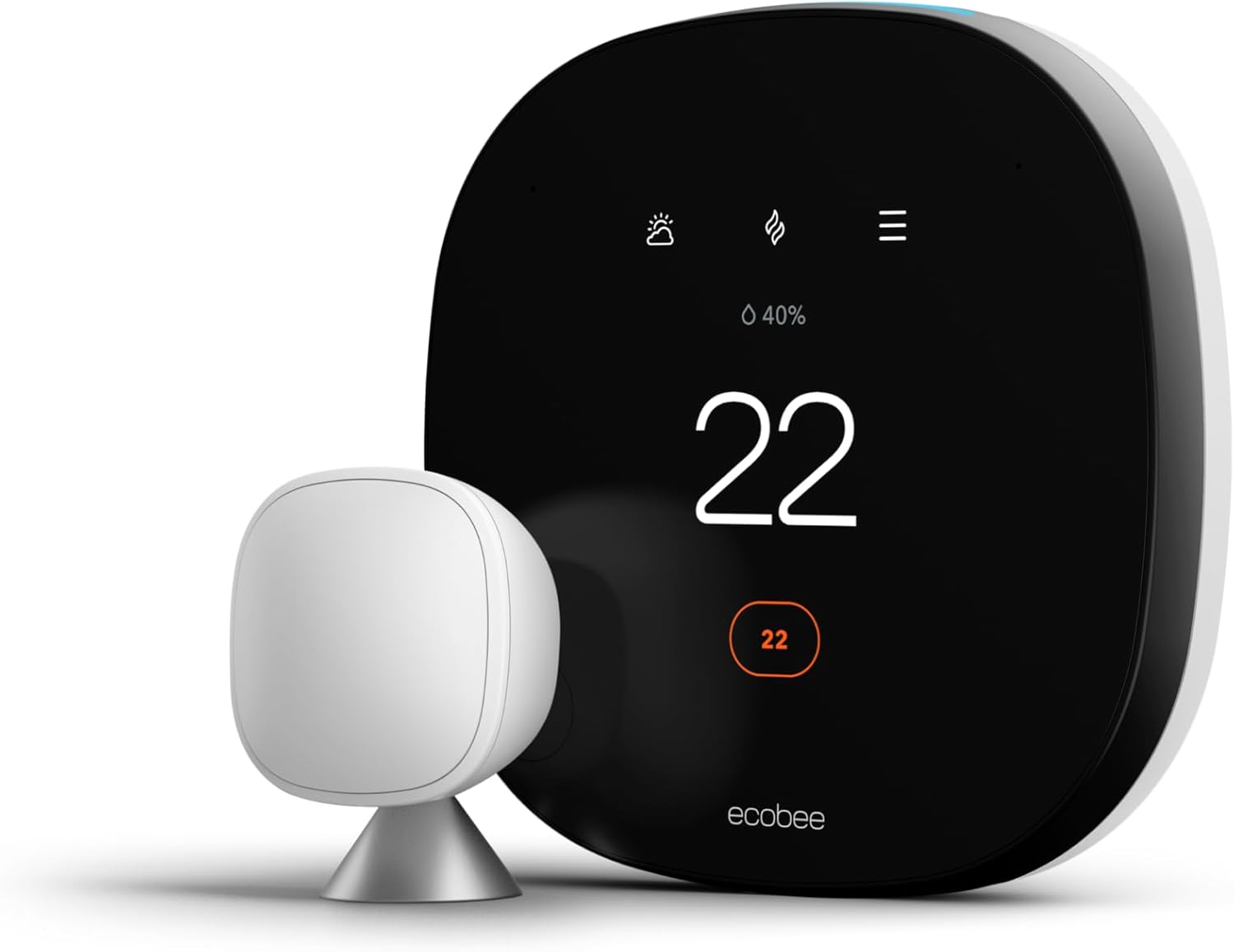
Product overview: ecobee Smart Thermostat with Voice Control – Programmable Wifi Thermostat – Works with Siri, Alexa, Google Assistant – Smart Thermostat for Home
You’ll get a feature-packed smart thermostat designed to save energy while keeping you comfortable where you actually spend your time. The ecobee Smart Thermostat with Voice Control combines built-in voice assistants, remote room sensors, and smartphone control to give you flexible, hands-free management of your heating and cooling.
What this model promises
This thermostat is ENERGY STAR certified and claims up to 26% annual savings on heating and cooling compared to a hold at 72°F/22°C. You’ll also get a SmartSensor (about a $50 value) that focuses comfort on the rooms you use most, reducing hot or cold spots.
ecobee Smart Thermostat with Voice Control - Programmable Wifi Thermostat - Works with Siri, Alexa, Google Assistant - Smart Thermostat for Home
What’s in the box and basic specs
You’ll find almost everything you need to install and start using the thermostat right away, except basic tools. Installation should take about 45 minutes if you’re comfortable with simple wiring and following instructions.
Physical components and included accessories
Inside the box you’ll typically find the smart thermostat unit, the included SmartSensor, mounting hardware, a trim plate, wiring labels or stickers, and printed quick-start guides. Everything focuses on making the swap from your old thermostat as painless as possible.
Key specs at a glance
You’ll benefit from Wi‑Fi connectivity, compatibility with iOS and Android control apps, built-in voice assistants (Siri + Alexa), Google Assistant support, and ENERGY STAR certification. The included SmartSensor helps manage temperature in the rooms that matter most.
Quick feature breakdown
Below is a table to help you quickly compare the main features, value, and what they mean for your home.
| Feature | What you get | Why it matters to you |
|---|---|---|
| ENERGY STAR certified | Efficient heating and cooling | Helps lower your energy bills and environmental footprint |
| Up to 26% energy savings* | Compared to a 72°F/22°C hold | Significant potential savings on annual utility costs |
| SmartSensor (included, $50 value) | One remote sensor included | Balances temperature in the rooms you use most, reducing hot/cold spots |
| Built-in voice control | Siri and Alexa built-in; works with Google Assistant | Hands-free control and flexible voice options |
| Smartphone control | iOS and Android apps | Adjust schedules and temperatures from anywhere |
| Installation | All necessary components included (except basic tools) | Typical install time about 45 minutes |
| Smart home integration | Works with major systems | Fits into most smart home setups for coordinated automation |
Purchase Ecobee Smart Thermostat — Amazon
Design and display
The thermostat’s design is modern and unobtrusive so it blends into most home interiors. You’ll notice a clear touchscreen display that’s easy to swipe through, read from a distance, and interact with for quick adjustments.
Build quality and materials
You’ll find a solid build with a premium feel to the touchscreen and bezel. The finish is neutral enough for bedrooms, living rooms, and hallways without drawing unnecessary attention.
User interface and navigation
Navigating menus is straightforward and responsive; you’ll swipe, tap, and use icons to adjust schedules or temperature. If you’re comfortable with smartphones, the thermostat’s touch interface will feel familiar and quick.
SmartSensor: where comfort matters
The included SmartSensor lets you measure temperature and occupancy in a specific room so the system can prioritize comfort where you are. Place it in a bedroom, office, or child’s room and the thermostat will account for that location instead of only the thermostat’s wall location.
How the SmartSensor works in practice
When the sensor detects you in a room, the thermostat can shift focus to that sensor’s reading, reducing hot and cold spots. This is especially helpful in homes with uneven heating or cooling, or rooms that otherwise register differently than the thermostat’s location.
When to add extra sensors
If you have multiple problem rooms or want precise comfort control across bedrooms and common areas, you can add more SmartSensors (sold separately). The more sensors you place strategically, the better the system can balance comfort throughout your home.
Energy savings and efficiency
You’ll see this model’s core selling point in its energy-saving capabilities, backed by ENERGY STAR certification and ecobee’s algorithms that optimize runtime. The claim of up to 26% savings is a headline figure that depends on your home, climate, and usage patterns.
How savings are achieved
The thermostat reduces wasted run-time by learning schedules, optimizing temperature setbacks, and using occupancy data from the SmartSensor to avoid conditioning empty rooms. It also integrates with smart home systems and weather data to precondition your home efficiently.
Realistic expectations for savings
Your actual savings will vary. If you already have a programmable thermostat and consistent schedules, improvements might be moderate. If your previous thermostat was manual or you frequently forget to adjust settings, you’ll likely notice larger savings.
Installation: what to expect
Installation is designed to be approachable for DIYers who are comfortable with basic wiring. The package contains most of what you’ll need and the process generally takes about 45 minutes.
Tools and prerequisites
You’ll need basic tools like a screwdriver and possibly a drill if the wall anchors are required. Make sure you have access to the existing thermostat wiring and a stable Wi‑Fi network during setup.
Wiring and compatibility notes
The thermostat works with most modern HVAC systems. If your heating and cooling setup is older or unusual, check the compatibility guide—most commonplace systems are supported, but unique or proprietary equipment may need professional help.
Setup and smartphone app
You’ll manage most of the advanced features through ecobee’s app on iOS or Android. The app walks you through account setup, device registration, and Wi‑Fi connection, then guides sensor registration and scheduling.
App usability and features
The app is user-friendly, offering schedule creation, temperature adjustment, energy reports, and SmartSensor management. You’ll appreciate remote control for on-the-go changes and the ability to quickly view energy usage trends.
Remote control and notifications
From anywhere, you’ll be able to adjust setpoints, switch modes, and receive notifications for things like extreme temperature changes or connection issues. This is helpful if you travel frequently or manage multiple homes.
Voice control and hands-free operation
With Siri and Alexa built in and Google Assistant support, you’ll have multiple ways to control the thermostat using voice commands. This is very convenient when your hands are full or when you want quick adjustments without opening the app or touching the thermostat.
Voice accuracy and responsiveness
The built-in assistants typically respond quickly for thermostat controls, music playback (if supported), and basic queries. You’ll find voice control practical for quick adjustments, though complex settings are often easier through the app or touchscreen.
Integrations with other smart devices
The thermostat integrates with major smart home platforms, so you can create automations like turning down the heat when a smart lock is set to away or syncing with a smart speaker to lower the temperature at night. This lets you build routines that match your daily habits.

Scheduling, automation, and smart features
You’ll be able to set schedules, use smart home automations, and let the thermostat adapt based on occupancy and weather data. The learning and predictive functions aim to keep comfort consistent while minimizing waste.
Preset schedules and custom routines
Create simple schedules for weekdays and weekends or build richer routines to match your household’s rhythms. The thermostat’s algorithms can also make small adjustments to keep you comfortable while being energy-conscious.
Smart home automations
Link with other devices to build scenes or automations—like lowering temperature when your security system arms away. These automations can add convenience and improve overall efficiency.
Performance and real-world experience
In daily use, you’ll find the thermostat is responsive and effective at keeping temperatures stable when sensors are placed in the right rooms. The SmartSensor improves comfort in bedrooms and offices where the thermostat’s wall location can’t tell the whole story.
Temperature accuracy and control
The thermostat maintains temperature closely and communicates efficiently with your HVAC system. When combined with sensors, you’ll notice fewer complaints about cold corners or overheated rooms.
Humidity, fan control, and additional HVAC features
The device supports typical HVAC controls like fan cycles, heat/cool modes, and schedule overrides. For complex systems, your installer or the ecobee app will guide configuration to ensure the thermostat manages all supported functions.
Reliability and updates
You’ll benefit from regular firmware updates that add features, fix bugs, and improve integration. ecobee has a history of supporting its products post-sale with software refinements.
Connectivity and downtime considerations
Like any Wi‑Fi device, a stable network improves reliability. If your Wi‑Fi goes down, the thermostat still runs local schedules and basic HVAC control but remote access and voice assistant features may be unavailable until connectivity returns.
Customer support and warranty
ecobee offers customer support resources, online documentation, and typically a limited warranty period on the hardware. You’ll want to check the current warranty terms when you purchase, and you can access help via the app or company support channels if issues arise.
Who this thermostat is best for
If you care about energy savings, want room-by-room comfort, and use voice assistants regularly, this thermostat is tailored for you. It’s especially useful for households with uneven heating/cooling, home offices, or families who want hands-free control.
When you might not need it
If you live in a small apartment with consistent temperature throughout and don’t care about smart features, a basic programmable thermostat may suffice. However, if you value convenience and potential energy savings, the ecobee still brings strong value.
Pros and cons
You’ll want a clear view of strengths and tradeoffs before deciding—here are the highlights.
Pros
- Strong potential energy savings and ENERGY STAR certification.
- SmartSensor included to target comfort in the rooms you use.
- Built-in voice assistants plus broad smart home compatibility.
- Easy-to-use app and remote control from iOS/Android.
- Modern design and intuitive touchscreen.
Cons
- More costly than basic programmable thermostats.
- Full benefit depends on placement and number of sensors (additional sensors cost extra).
- Requires Wi‑Fi for remote features and voice control—local controls still work during outages.
- Installation may be slightly technical for some users, depending on HVAC wiring.
Comparison to other smart thermostats
You’ll find competitors like Google Nest and Honeywell offer similar features, but ecobee differentiates with included room sensors and multiple built-in voice assistants. If room-level comfort is important, the included sensor is a notable advantage.
Strengths vs. competitors
ecobee’s room-sensor approach often outperforms single-point thermostats in homes with uneven heating. The multiple built-in voice assistant options also give you more flexibility than models that rely on external smart speakers.
Possible reasons to choose another model
If you prefer a more minimalist design or tighter integration exclusively with one ecosystem, another thermostat (for example, one tightly integrated with Google Home or Apple HomeKit) might suit specific preferences better. Still, ecobee offers a balanced multi-ecosystem approach.
Troubleshooting tips and common issues
You’ll likely have a smooth experience, but here are practical tips if you hit snags.
Wi‑Fi and app connection issues
If your thermostat loses connection, restart your router and the thermostat, and confirm you’re using the correct Wi‑Fi network and password. Ensure firmware and app updates are current.
Sensor pairing and placement
If a SmartSensor doesn’t appear to affect temperature as expected, verify the sensor is within range and placed away from direct sunlight, vents, or heat sources. Re-pair a sensor through the app if needed.
HVAC compatibility quirks
If a function of your HVAC system isn’t responding, double-check wiring and system type settings in the app. When in doubt, consult ecobee’s compatibility guide or contact support.
Frequently asked questions (FAQ)
You’ll find short answers to common questions about installation, compatibility, and capabilities here.
Do you need a C‑wire?
Many modern thermostats work best with a C‑wire for consistent power. Check your system before installation; ecobee often provides guidance or hardware options to handle typical wiring setups. Refer to ecobee’s compatibility checker for the most accurate answer for your system.
Can you add more SmartSensors?
Yes—you can add additional SmartSensors if you want to manage more rooms. Each sensor helps the thermostat focus on where you are, improving comfort and reducing wasted conditioning.
Will this work with my smart home?
The thermostat integrates with major platforms, including Apple HomeKit (Siri), Amazon Alexa, and Google Assistant, and works with many other smart devices for automation. If you use a particular ecosystem, confirm specific integrations for any advanced automations you plan.
What happens during a power outage?
The thermostat will retain basic local control and programmed schedules in most cases, but remote app control and voice assistants that rely on internet connectivity will be unavailable until power and network access are restored.
Maintenance and long-term use
You’ll want to keep the thermostat and sensors clean and updated for best performance. Regular firmware updates and occasional sensor battery checks (if applicable) will prolong smooth operation.
Battery and sensor checks
If sensors use batteries, replace them as needed and periodically confirm device connectivity in the app. The thermostat itself is mains-powered through your HVAC wiring.
Firmware updates and feature upgrades
Keep the thermostat’s firmware current to access new features, bug fixes, and integrations. The app will typically notify you when updates are available.
Final verdict
If you value targeted comfort, actionable energy savings, and the convenience of multiple voice assistants built in, the ecobee Smart Thermostat with Voice Control is a compelling choice for most homes. You’ll appreciate the included SmartSensor, smart scheduling, and seamless smartphone control that together create a smarter, more comfortable home environment.
Who should buy it
Choose this thermostat if you want room-by-room comfort, plan to integrate with voice assistants or a larger smart home setup, and want ENERGY STAR-backed efficiency. It’s a strong pick for homeowners who are ready to manage comfort remotely and reduce energy waste.
Who might look elsewhere
If you want the cheapest possible thermostat or live in a small space where a single temperature sensor is sufficient, a simpler model may be more cost-effective. Still, the ecobee’s features often justify the price for those seeking flexibility and savings.
Recommendation and next steps
You should weigh your home’s layout, HVAC complexity, and whether room-level sensing will improve comfort. If those line up, the ecobee Smart Thermostat with Voice Control delivers a feature-rich, energy-conscious solution that’s easy to integrate into most smart homes. If you decide to purchase, prepare basic tools, confirm wiring compatibility, and plan for about 45 minutes to install and configure your new thermostat.
Get The Ecobee Smart Thermostat Now On Amazon
Disclosure: As an Amazon Associate, I earn from qualifying purchases.